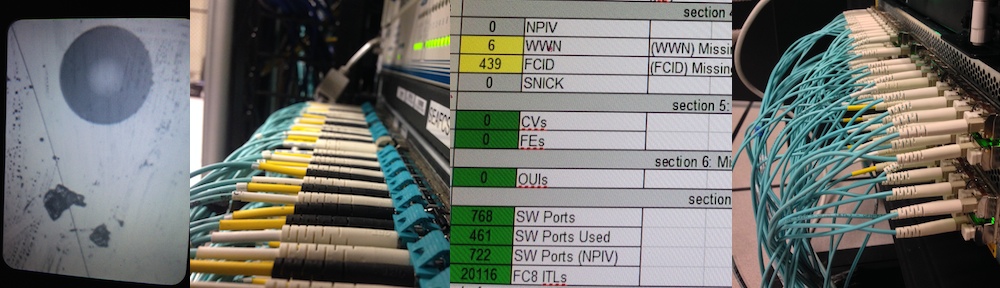
Fixed the access parameters for OnCommand Service Manager osmsql:// nickname source added in r516 and r525 based on Patrick’s info
Category Archives: Uncategorized
Revision 539 – Tracking RemoteWisdom Sequence
RemoteWisdom can now trigger a PHC run.
The sequence “Run PHC” is backed by RunPHC.seq which is now tracked as a sample method of running phc-xlsx.jar from inside RemoteWisdom Access Gateway, or RWAG, based on a click in the RemoteWisdom Enterprise portal.
Revision 537 – Confirm DB Backup is OK
I had a few customers who had no idea their backups were not running. Typically this is because of space-exhaustion, but sometimes this was because the backup schedule was not set, or it had become deactivated.
PHC on/after version 0.2-537 will now confirm that a backup was completed within 14 days; this value was chosen based on the recommendation that backups be done weekly, and the longest possible “staleness” of a backup is when the next backup is running: 7 days. Missing two backups is a critical concern. If a backup wasn’t scheduled, then there will be no backup logged; if a backup fails due to space, it will still be cause by not showing a completed backup. Either way, we can now catch when a portal service has no protective backup and is a risk to upgrading.
Revision 536 – FixNickNameHistory for Database Back-Edits
In Revision 536, I implemented “–fixnicknamehistory” which applies any loaded nicknames (for example, those gained using OnCommand Extraction, those Parsed from Cisco Zones, or those extracted from BNA) to the underlying Portal Server database retroactively.
So long as the Portal Service is shut down, this can be done on a customer’s live server, but it’s more useful in analysis where nicknames arrived late yet the analyst cannot wait another week or so for nickname-ful summaries to be collected.
Revision 533 – Semi-Statistical Summary Insertion Delay
In this revision, I incorporate Welford-via-Knuth into the running statistical calculation, providing a running mean/deviation calculation to show where the greater portion of insertion delay are.
Why?
The “mean” of a value is nearly useless for planning: it’s just an average. An understanding of how that value varies can help get a better idea of it just as any ability to match the behaviour to a predictable curve. A mean+/-1deviation can give a basic idea; a mean+/-3deviation can show where generally “all the non-unusual ones” land. Put another way, mean+/-3deviation can tell where all the value land once the aberrant outlying points are removed.
Currently, this means that the summary calculation now shows the mean delay plus the mean+1deviation “ceiling”: a mean +/- deviation provides two values of course, but we only worry about the worst case when a risk exists of taking too long to insert a summary row.
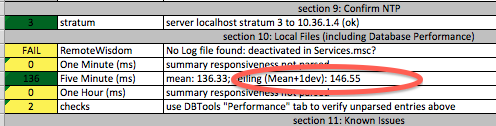
PHC-0.2-536 showing mean+1deviation
Currently, I’m not sure whether the mean+1deviation is the more critical value than the reported mean, nor whether we should shift to the mean+3deviation as a more appropriate metric.
Revision 530 – PHC – Avoid Some Checks Where Not Applicable
This revision reduces some clutter in that some checks that don’t apply — such as ProbeVM checks in a ProbeSW-only environment — are avoided. In that way, the content shown has higher signal-to-noise ratio.
Revision 529 – Check Summary Average Delay
Revision 529 is where the FileSystem Layout Detection (r527) is used to start highlighting risks in Summary Insertion Delay.
I would prefer to also look at the insertion time rather than delay, as delay may well remain constant while the actual insertion cost can lead to longer delay. That’s like addressing speed difference rather than distance between two race cars: looking at differences in speed can alert more quickly and predict changes in distance. Similarly, more metrics can be watched once I figure them out. Just like most users, I’m looking from the outside, but I can fake up the interpreted content in a known-ciphertext-attack -like method of using conditioned input to the parser to tell me what I’m seeing.
Revision 527 – Improved FileSystem Layout Detection
internal: the detection of filesystem layout and file relative locations was all twisted, and was flakey. So I’m ripping it out. It’s mostly refactored, but in order to leverage it sooner, there are currently both methods active. The flakey one will finish dying very soon, but in the meantime, only most of the code benefits from this structure change rather than all of it.
The way I’m doing it now is a straight Booch-ian method of taking multiple objects and using them to encapsulate the logic. They are interchangeable. The most applicable will be chosen by — you guessed it — voting. Whichever one looks most likely will be used. This allows me to abstract off discovery of pathnames and locations as they change from live server, PortalLogs, and database backup without huge changes in code and whackloads of if/else loops.
The behavior I wanted to leverage more quickly is the reading of summarymon log to check performance at the database insertion side.
Revision 526 – Vote02-ZoneSplit2onTargetPrefix.awk
Every customer is different, and their nicknames of zone titles is no exception. There is no clear consistency in zone names which can then lead near-consistently to Attached Device Names. Nearly.
Zone-Vote Algorithm is always an assumption-lead guess. It poses only a slim chance of being 100% accurate.
In cases where the target in a zone title starts with the same prefix, this Stage-2 of the process can help narrow it down. I added Vote02-ZoneSplit2onTargetPrefix.awk to split zone names based on the prefix of the target device (for example if all targets start with STOR*)
Revision 521 – Dump-Config for ESX HBAs to Check PHC
In revision 521, I added the ability to dump out the esx hbas as esxhbas.csv, esxhbas.xml, vminventoryraw.csv, or vminventoryraw.xml similar to dumping roving.xml and roving.csv. The outputs are self-documenting in #comments in the CSV, or as XML self-documents already. The benefit of this function is that when the PHC seems to miscalculate the HBA speeds in phc-vm.csv, the raw data can be debugged. Note that the XML has no whitespace, so “xmllint -format esxhbas.xml” is your friend.
For example:
(typically running locally: the MySQL is configured to only accept local connections)
java -jar vict.jar -D esxhbas.csv
or
java -jar vict.jar -D esxhbas.xml
…and in long-options too:
java -jar vict.jar --dump-config esxhbas.xml
…but since the JRE is typically hidden below the VirtualWisdom directory, use vict.bat:
VICT.BAT -D esxhbas.xml
VICT.BAT --dump-config esxhbas.xml